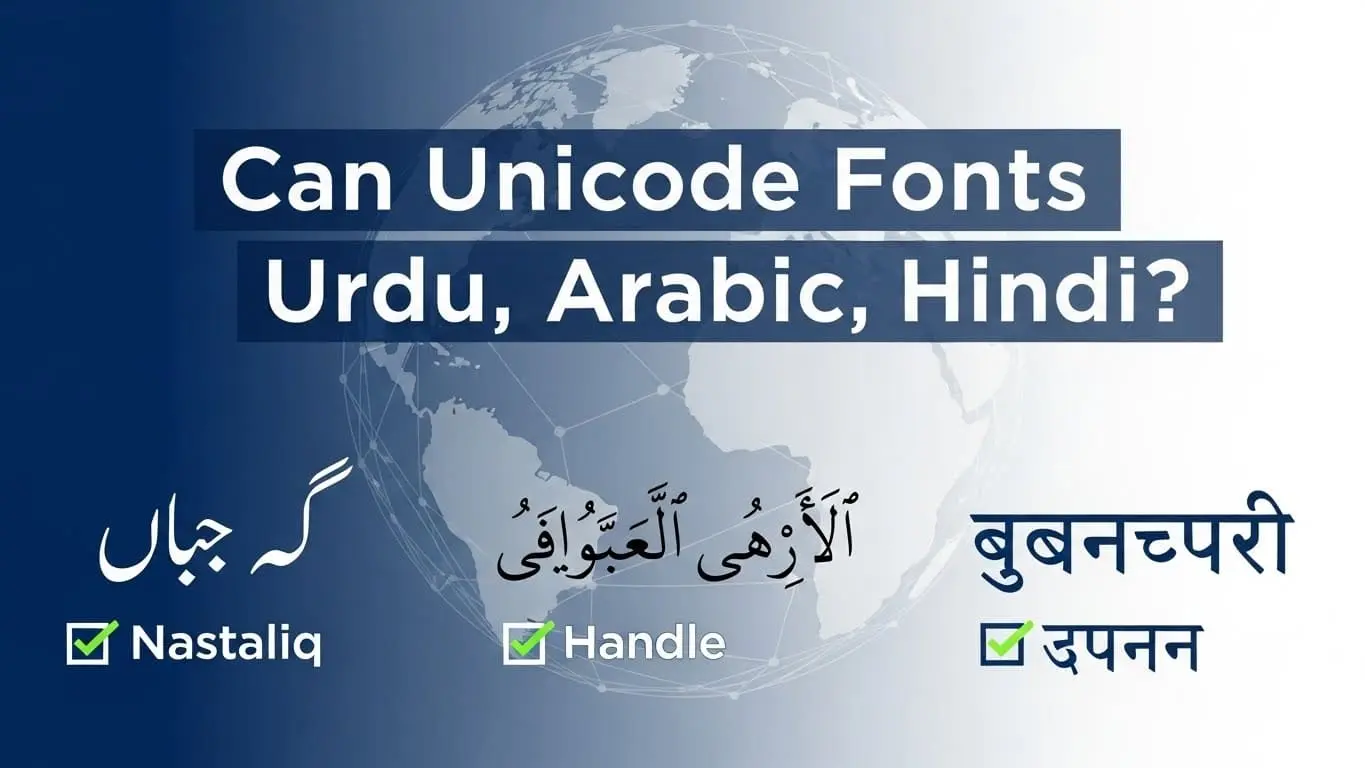
Can Unicode Fonts Handle Urdu, Arabic, Hindi?
Building a website for a global audience, and suddenly you realize your beautiful design falls apart when displaying Arabic, Urdu, or Hindi text. Letters appear disconnected, words look broken, and your carefully crafted user experience crumbles. If you’ve ever wondered “Can Unicode fonts handle Urdu, Arabic, Hindi?” – you’re asking exactly the right question.
Unicode fonts are capable of supporting Urdu, Arabic, and Hindi, but not all fonts perform equally, as proper OpenType feature implementation is essential for accurate rendering.
Complex scripts rely on specialized font features such as contextual shaping, ligature support, and correct right to left text direction handling. Quality is more important than simple character coverage, so it is best to choose fonts with robust OpenType features rather than those that only offer basic Unicode support.
Testing fonts across multiple platforms is critical because rendering can differ widely between browsers, operating systems, and devices. Using modern web fonts along with correct CSS implementation helps ensure these scripts display consistently across all platforms.
Can Unicode Fonts Handle Urdu, Arabic, Hindi? The Short Answer
Yes, Unicode fonts can absolutely handle Urdu, Arabic, and Hindi scripts. The Unicode standard was specifically designed to support all the world’s writing systems, including these complex scripts that require sophisticated rendering capabilities.
While Unicode provides the character encoding foundation, not all fonts implement the advanced features needed for proper display. Think of Unicode as the vocabulary, while fonts are the skilled interpreters who know how to present that vocabulary beautifully and correctly.
The key lies in understanding that these scripts aren’t just about having the right characters – they require intelligent font technology that can handle contextual letter forms, complex ligatures, and sophisticated text layout rules. When you choose the right Unicode font with proper OpenType support, these languages display flawlessly across digital platforms.
Understanding Unicode and Complex Script Support
What Is Unicode?
Unicode is the universal character encoding standard that assigns a unique number (called a code point) to every character in virtually every writing system used on Earth. Before Unicode, different computer systems used incompatible encoding schemes, making it nearly impossible to share text across platforms without corruption.
The Unicode Consortium maintains this standard, which currently covers over 1.1 million characters across 159 scripts. Unicode 16.0, released in 2026, continues to expand support for historical scripts and emerging writing systems. This standardization means that whether you’re on a Windows PC in New York or an Android phone in Karachi, the same character code represents the same letter.
What makes Unicode revolutionary is its comprehensive approach. Rather than treating each language as a separate problem, Unicode provides a unified framework where Arabic ا, Urdu ا, and Hindi अ each have their distinct, permanent addresses in the digital universe.
What Makes Urdu, Arabic, and Hindi “Complex” Scripts?
These writing systems are considered “complex” because they require sophisticated rendering rules that go far beyond simple character placement. Let me break down what makes them special:
Right-to-Left (RTL) Text Direction: Arabic and Urdu flow from right to left, which means text layout engines must handle bidirectional text when mixed with English or numbers. This isn’t just about reversing text – it requires intelligent handling of word boundaries, punctuation, and embedded content.
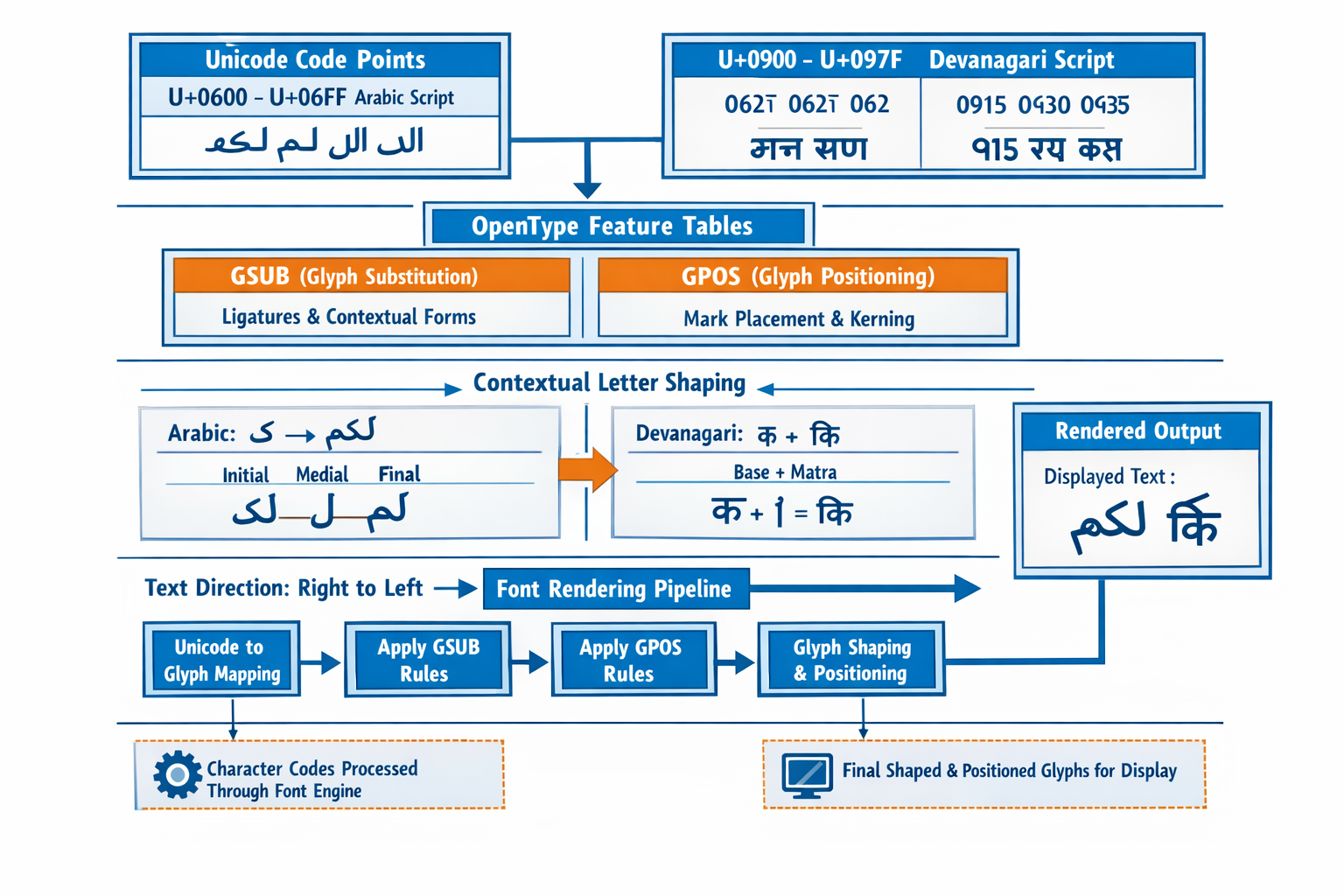
Contextual Letter Forms: In Arabic and Urdu scripts, letters change shape depending on their position in a word. The letter ب (baa) has four different forms: isolated (ب), initial (بـ), medial (ـبـ), and final (ـب). A quality Unicode font automatically selects the correct form based on context.
Complex Ligatures: Certain letter combinations must connect in specific ways. For example, لا (lam-alif) in Arabic should render as a single, elegant ligature rather than two separate letters.
Diacritical Marks and Vowel Signs: Hindi uses matras (vowel marks) that attach to consonants in precise positions. Arabic and Urdu use diacritics for proper pronunciation. These marks must position correctly regardless of the base character’s shape.
How Unicode Handles Different Writing Systems
Arabic and Urdu Script Support
Unicode allocates the Arabic script to the range U+0600 to U+06FF, which covers the basic Arabic letters used in classical Arabic, Persian, and Urdu. Additional blocks like Arabic Extended-A (U+08A0 to U+08FF) provide characters for specific regional languages and historical texts.
For Urdu specifically, Unicode includes characters like ے (yeh barree) and ں (noon ghunna) that distinguish Urdu from standard Arabic. The encoding also supports the beautiful Nastaliq calligraphic style traditionally used for Urdu, though this requires specialized fonts designed for this aesthetic.
Contextual shaping is where the magic happens. When you type consecutive Arabic or Urdu letters, the font’s OpenType engine automatically:
- Connects letters that should join
- Selects appropriate letter forms (initial, medial, final, isolated)
- Applies ligatures for letter combinations
- Positions diacritical marks correctly
Kashida (text justification) is another sophisticated feature where Arabic and Urdu text can be justified by extending the connecting strokes between letters, rather than adding spaces like in English.
Hindi and Devanagari Script Support
Hindi uses the Devanagari script, encoded in Unicode blocks U+0900 to U+097F. This script presents different challenges than Arabic scripts, primarily around conjunct formation and vowel positioning.
Conjunct characters occur when consonants combine without intervening vowels. For example, क + ष = क्ष (ksha). The font must recognize these combinations and render them as single, integrated characters rather than separate letters with visible halant marks.
Vowel matras (vowel signs) attach to consonants in various positions – before, after, above, or below the base character. The vowel ि (i) appears before its consonant visually but is typed after it logically. Unicode fonts must handle this complex reordering automatically.
Nukta and combining marks add another layer of complexity. The nukta dot (़) modifies base characters to represent sounds borrowed from other languages, like क़ (qa) in Hindi words of Arabic origin.
The Role of OpenType Features
OpenType technology is what transforms basic Unicode character codes into beautiful, correctly rendered text. Think of OpenType as the sophisticated instruction manual that tells fonts how to handle complex scripts properly.
GSUB (Glyph Substitution) tables contain rules for replacing characters with appropriate forms. When you type Arabic ب followed by another letter, GSUB rules substitute the isolated form with the initial form and ensure proper connection.
GPOS (Glyph Positioning) tables handle precise positioning of marks, adjustments for kerning, and proper spacing. This is crucial for positioning Hindi vowel marks or Arabic diacritics accurately.
Essential OpenType features for complex scripts include:
- ccmp (Canonical Composition): Basic character composition
- liga (Standard Ligatures): Required letter combinations
- calt (Contextual Alternates): Context-sensitive character variants
- mark (Mark Positioning): Diacritical mark placement
- mkmk (Mark-to-Mark): Positioning of multiple marks
Not All Unicode Fonts Are Created Equal
Basic Unicode Support vs. Full Script Support
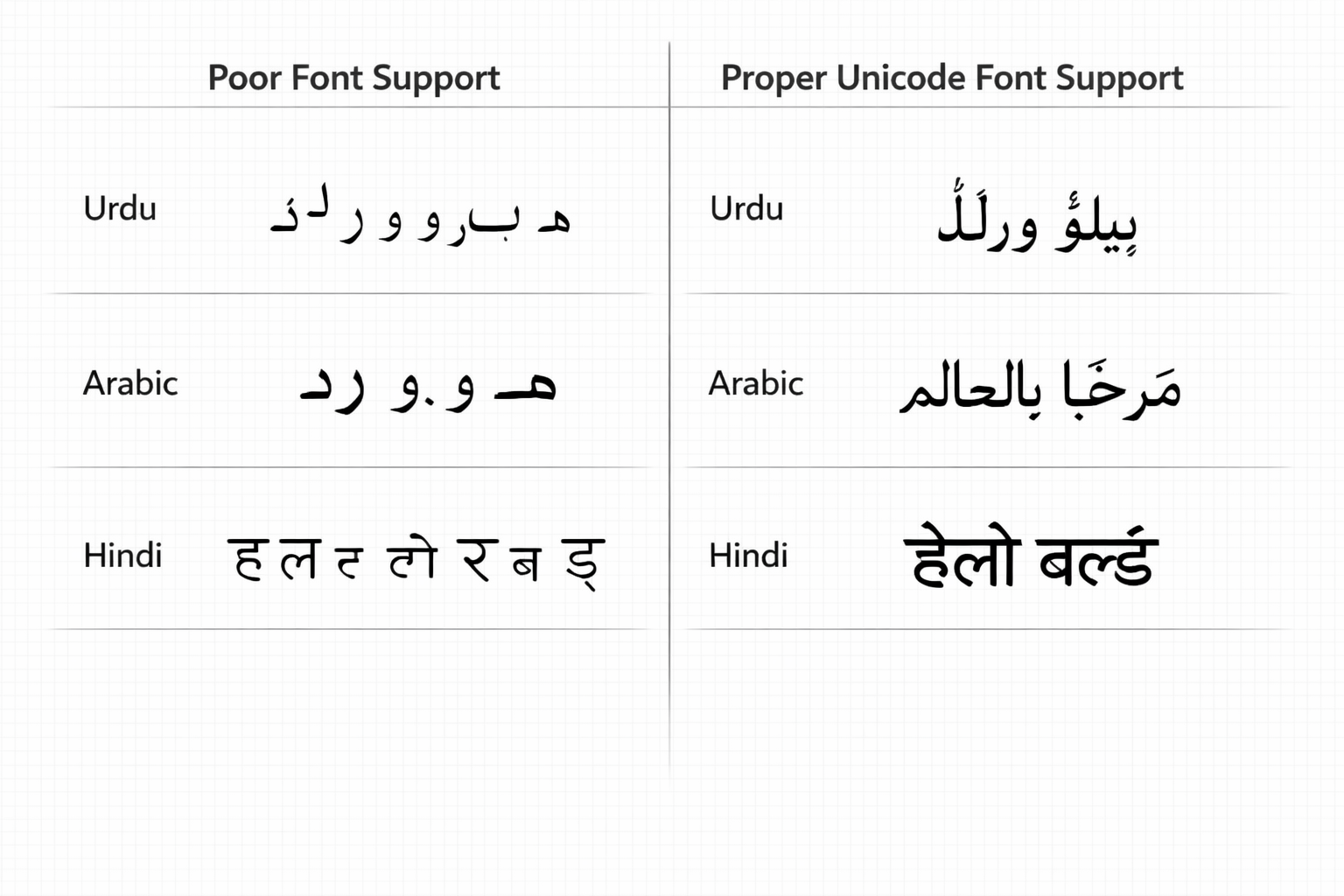
Here’s where many people get confused: having Unicode characters doesn’t guarantee proper rendering. A font might contain every Arabic letter but completely fail at contextual shaping, resulting in text that looks like scattered, disconnected symbols.
I’ve seen countless websites where Arabic text appears as ب ا ب instead of the properly connected باب (door). The characters are technically correct, but the font lacks the OpenType intelligence to connect them appropriately.
True script support requires:
- Complete character coverage for the target language
- Comprehensive OpenType feature implementation
- Proper handling of text direction and layout
- Quality design that respects typographic traditions
Font Quality Indicators
When evaluating whether a Unicode font can handle Urdu, Arabic, or Hindi properly, look for these quality indicators:
✅ Complete Character Coverage: The font should include all characters needed for your target language, including extended characters and punctuation marks specific to that script.
✅ Proper Contextual Shaping: Arabic and Urdu letters should connect naturally, with smooth transitions between letter forms.
✅ Comprehensive Ligature Support: Common letter combinations should render as elegant, integrated forms rather than awkward character clusters.
✅ Accurate Mark Positioning: Diacritics and vowel signs should position precisely, even when multiple marks appear on a single character.
✅ Cross-Platform Compatibility: The font should render consistently across different operating systems and browsers.
❌ Red flags include disconnected letters, overlapping marks, missing characters (displayed as boxes), and inconsistent spacing.
Best Unicode Fonts for Urdu, Arabic, and Hindi
Top Fonts for Arabic and Urdu
Noto Naskh Arabic stands out as my top recommendation for Arabic text. Developed by Google as part of their mission to support all languages, Noto Naskh Arabic provides comprehensive character coverage and excellent OpenType feature implementation. It’s free, regularly updated, and works beautifully across all platforms.
Noto Nastaliq Urdu deserves special mention for Urdu content. Unlike standard Arabic fonts, this font captures the flowing, calligraphic beauty of traditional Urdu Nastaliq style. It’s particularly important for Urdu because it respects the aesthetic traditions that Urdu readers expect.
Amiri offers a more traditional, classical appearance inspired by traditional Arabic typography. It includes extensive character coverage and sophisticated OpenType features, making it excellent for formal documents or websites that want to convey elegance and tradition.
Scheherazade New provides exceptional character coverage, supporting not just Arabic and Urdu but also many other languages that use Arabic script. It’s particularly valuable for academic or multilingual content.
Traditional Arabic (included with Microsoft Office) offers reliable cross-platform compatibility and clean, readable design that works well for both print and screen applications.
Top Fonts for Hindi/Devanagari
Noto Sans Devanagari and Noto Serif Devanagari provide the most comprehensive and reliable support for Hindi text. These fonts handle complex conjunct formation flawlessly and position vowel marks with precision. The Sans version works excellently for digital interfaces, while the Serif version suits longer reading materials.
Mangal comes pre-installed on Windows systems and offers solid, dependable Hindi rendering. While not as feature-rich as newer fonts, it provides consistent results across Windows environments.
Lohit Devanagari represents an excellent open-source option with good OpenType feature support. It’s particularly popular in Linux environments and offers clean, readable text rendering.
Hind brings a modern, clean aesthetic to Devanagari typography. Designed specifically for contemporary digital applications, it offers excellent readability on screens while maintaining proper script rendering.
Universal Multilingual Fonts
The Noto font family deserves recognition as the most ambitious multilingual font project ever undertaken. Google’s goal of ensuring “no more tofu” (the boxes that appear for unsupported characters) has resulted in fonts that cover virtually every writing system. For projects requiring multiple scripts, Noto fonts provide consistent design and reliable rendering across languages.
Arial Unicode MS, while older, still provides broad character coverage and reasonable rendering for multiple scripts. However, its OpenType feature support isn’t as comprehensive as newer fonts.
Testing Unicode Font Compatibility
Browser Testing
Before deploying any multilingual content, thorough testing across browsers is essential. Chrome, Firefox, and Safari each implement text rendering slightly differently, and what looks perfect in one browser might have issues in another.
Use your browser’s developer tools to inspect font rendering. In Chrome, right-click on text and select “Inspect” to see which fonts are actually being used. Sometimes your specified font might not load, and the browser falls back to system fonts with poor script support.
Online testing tools like Google Fonts’ preview feature or dedicated typography testing sites can help you evaluate fonts quickly across different scenarios.
Operating System Support
Windows uses DirectWrite for text rendering, which generally provides good support for complex scripts when proper fonts are installed. Recent Windows versions include improved fonts like Segoe UI Historic and updated versions of traditional fonts.
macOS leverages Core Text technology, which offers excellent support for complex scripts. Apple’s system fonts generally handle multilingual content well, though you might still want custom fonts for specific aesthetic requirements.
Linux systems use Pango for text rendering, with support quality varying depending on the distribution and installed fonts. Installing the Noto font family usually resolves most compatibility issues.
Mobile platforms (iOS and Android) generally handle Unicode fonts well, but testing on actual devices remains important since rendering can differ from desktop browsers.
Red Flags for Poor Font Support
Watch for these warning signs that indicate inadequate font support:
🚫 Disconnected letters in Arabic or Urdu text suggest the font lacks contextual shaping features.
🚫 Missing ligatures result in awkward letter combinations that should flow together naturally.
🚫 Incorrect mark positioning causes diacritics or vowel signs to appear in wrong locations or overlap with base characters.
🚫 Broken conjuncts in Hindi appear as separate letters with visible halant marks instead of integrated character forms.
Implementing Unicode Fonts on Your Website
Web Font Integration
Modern web development makes implementing Unicode fonts straightforward. Google Fonts provides the easiest path for most projects, offering high-quality fonts with simple integration:
@import url('https://fonts.googleapis.com/css2?family=Noto+Naskh+Arabic&family=Noto+Sans+Devanagari&display=swap');
For custom fonts, use the @font-face declaration:
@font-face {
    font-family: 'CustomArabic';
    src: url('fonts/custom-arabic.woff2') format('woff2'),
         url('fonts/custom-arabic.woff') format('woff');
    font-display: swap;
}
Font subsetting can dramatically reduce file sizes by including only the characters you need. If your Arabic content uses a limited character set, subsetting can cut font files from several megabytes to just a few hundred kilobytes.
CSS Best Practices
Proper language declaration helps browsers apply appropriate rendering rules:
<p lang="ar" dir="rtl">النص العربي</p>
<p lang="ur" dir="rtl">اردو متن</p>
<p lang="hi">हिंदी पाठ</p>
Create robust font stacks that provide good fallbacks:
.arabic-text {
    font-family: 'Noto Naskh Arabic', 'Traditional Arabic', 'Arial Unicode MS', sans-serif;
    direction: rtl;
    text-align: right;
}

.hindi-text {
    font-family: 'Noto Sans Devanagari', 'Mangal', 'Arial Unicode MS', sans-serif;
}
The font-display: swap property ensures text remains visible during font loading, preventing invisible text periods that frustrate users.
Performance Optimization
Font preloading can improve perceived performance for critical fonts:
<link rel="preload" href="fonts/noto-arabic.woff2" as="font" type="font/woff2" crossorigin>
Subsetting strategies should balance file size with character coverage. For Arabic fonts, you might subset to include only the characters needed for your specific content, dramatically reducing download sizes.
Progressive enhancement ensures your content remains accessible even if custom fonts fail to load. Always specify appropriate fallback fonts that can handle your scripts adequately.
Common Issues and Solutions
Rendering Problems
Text displaying as boxes or question marks typically indicates missing character support or encoding issues. First, verify that your HTML declares the correct character encoding:
<meta charset="UTF-8">
Next, ensure your font actually contains the characters you’re trying to display. Use browser developer tools to inspect which fonts are being applied and whether character substitution is occurring.
Direction and Alignment Issues
Mixed LTR/RTL content requires careful HTML markup and CSS handling. Use the dir attribute appropriately and consider the unicode-bidi CSS property for complex layouts:
.mixed-content {
    unicode-bidi: embed;
}
Text alignment in RTL languages should default to right-aligned, but be mindful of user interface elements that might need special handling.
Font Fallback Failures
Ineffective font stacks can result in poor rendering when primary fonts fail to load. Always include system fonts that support your target scripts:
/* Good fallback stack for Arabic */
font-family: 'Noto Naskh Arabic', 'Traditional Arabic', 'Tahoma', sans-serif;

/* Good fallback stack for Hindi */
font-family: 'Noto Sans Devanagari', 'Mangal', 'Arial Unicode MS', sans-serif;
Mobile Display Problems
Mobile font rendering can differ significantly from desktop. Test on actual devices and consider that mobile browsers might have different font availability. Web fonts provide the most consistent cross-device experience.
Performance on mobile matters more due to slower connections. Prioritize font loading for critical content and consider using system fonts for less important text elements.
The Future of Unicode and Complex Scripts
The landscape of Unicode font support continues evolving rapidly. Unicode 16.0 and future versions will expand support for historical scripts and emerging writing systems, while font technology advances to handle even more sophisticated rendering requirements.
Variable fonts represent an exciting development for complex scripts. These fonts can adjust weight, width, and other parameters dynamically, potentially offering more nuanced control over script rendering while reducing file sizes.
Artificial intelligence and machine learning are beginning to influence font rendering, with systems that can automatically optimize character spacing, ligature selection, and mark positioning based on content analysis.
Web standards evolution continues improving support for complex scripts. CSS specifications increasingly recognize the needs of global typography, with new properties and values designed specifically for non-Latin scripts.
The bottom line is clear: support for Urdu, Arabic, and Hindi will only get better. Investing in proper Unicode font implementation today positions your projects for seamless compatibility with future improvements.
Conclusion
So, can Unicode fonts handle Urdu, Arabic, and Hindi? Absolutely – when you choose the right fonts with proper OpenType feature implementation. The key is understanding that Unicode provides the foundation, but font quality determines the final result.
Remember these essential points: prioritize fonts with comprehensive OpenType support over basic character coverage, test thoroughly across platforms and browsers, and implement proper HTML markup and CSS for optimal rendering. Modern fonts like the Noto family, Amiri, and other quality options provide excellent support for these complex scripts.
The digital world has come remarkably far in supporting global languages. By choosing quality Unicode fonts and following best practices for implementation, you can create beautiful, accessible experiences for users of Urdu, Arabic, and Hindi – and contribute to a more inclusive digital future.
Take action today: audit your current font choices, test them with actual content in your target languages, and upgrade to modern, well-supported fonts where needed. Your global audience will notice the difference, and you’ll be prepared for whatever the future of digital typography brings.