Make a Gaming Clan Tag That Works on Any Device
Picture this: you’ve spent hours crafting the perfect clan tag with cool symbols and special characters, only to discover it shows up as empty squares on your teammate’s mobile device or completely disappears on console. Sound familiar? You’re not alone in this frustration.
The gaming world spans multiple platforms, from high-end PCs to smartphones and gaming consoles. Each device handles text differently, which means your carefully designed clan tag might work perfectly on your setup but fail miserably elsewhere. This inconsistency can break team identity and create confusion during matches.
Here’s the thing: Make a Gaming Clan Tag That Works on Any Device isn’t just about picking random letters. It requires understanding character compatibility, platform limitations, and smart design choices that ensure your tag displays consistently across all gaming environments.
Key Takeaways
• Universal characters (A-Z, 0-9, basic symbols) ensure your clan tag displays correctly on all devices and platforms • Length matters – keeping tags between 2-5 characters maximizes compatibility across different games and systems • Testing is crucial – always verify your tag works on PC, mobile, and console before finalizing your choice • Avoid special fonts and emojis – these often fail to render properly on different devices and game engines • Simple designs work best – clean, readable tags perform better than complex symbol combinations
What Is a Gaming Clan Tag?
A gaming clan tag serves as your team’s digital signature in the online gaming world. It’s a short identifier that appears before or after your username, instantly showing other players which group you belong to.
Think of clan tags as digital jerseys. Just like sports teams wear matching uniforms, gaming clans use consistent tags to build recognition and team identity. When you see “[PRO]PlayerName” or “PlayerName|ACE|” in a match, you immediately know they’re part of an organized group.
Clan tags appear in various places:
- Before or after usernames in lobbies
- On leaderboards and scoreboards
- In chat messages and communications
- During gameplay and spectator modes
- In tournament brackets and competitive play
The tag becomes part of your gaming identity, representing your team’s values, skill level, and community presence across multiple games and platforms.
Why Clan Tags Fail on Different Devices
Understanding why clan tags break across devices helps you avoid common pitfalls. The root cause lies in how different systems handle text encoding and font rendering.
Unicode vs ASCII complications create the biggest compatibility issues. While modern systems support Unicode (allowing fancy symbols and international characters), many games and older platforms stick to ASCII basics. When your tag uses Unicode characters that aren’t supported, they display as question marks, empty boxes, or disappear entirely.
Platform font limitations add another layer of complexity. Mobile devices often use different default fonts than PCs, and gaming consoles have their own text rendering systems. A symbol that looks perfect on your Windows PC might not exist in the font library of an Xbox or PlayStation.
Mobile vs console rendering presents unique challenges. Mobile screens prioritize readability and battery efficiency, sometimes simplifying character display. Console systems focus on performance, potentially stripping out complex characters that could slow down game rendering.
Game engine restrictions vary significantly between titles. Some games actively filter certain characters for security or performance reasons. Others have built-in character limits that affect how tags display in different interface elements.
Make a Gaming Clan Tag That Works on Any Device
Creating a universally compatible clan tag requires following specific rules that ensure consistent display across all platforms. Let’s break down the essential guidelines for building tags that never fail.
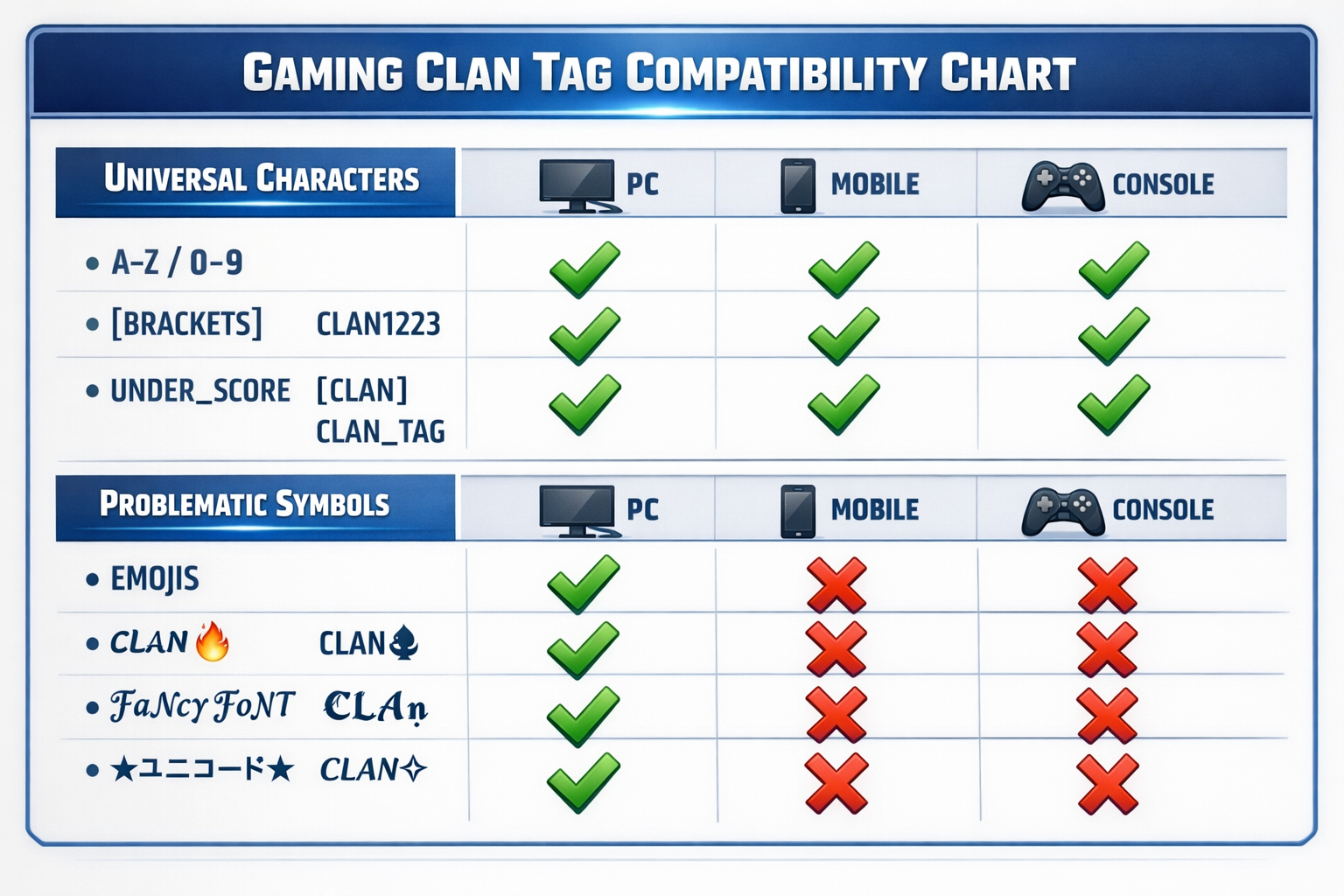
Universal character rules form the foundation of device compatibility. Stick to the basic ASCII character set: letters A-Z (both uppercase and lowercase), numbers 0-9, and safe punctuation marks. These characters exist in virtually every font and display system worldwide.
Length limits matter more than you think. Most games handle 2-5 character tags without issues, but longer tags often get truncated or cause display problems. Shorter tags also load faster and take up less screen space during intense gaming moments.
Capitalization creates visual impact without adding compatibility risks. Mixing uppercase and lowercase letters (like “AcE” or “Pro”) gives your tag personality while staying within safe character boundaries. Avoid alternating caps that might look unprofessional.
Smart symbol selection can enhance your tag without breaking compatibility. Safe symbols include:
- Square brackets: [TAG]
- Vertical bars: |TAG|
- Underscores: TAG
- Hyphens: -TAG-
These symbols work reliably across platforms because they’re part of the basic ASCII set that all systems support.
Best Characters That Work on All Platforms
Building a foolproof clan tag starts with choosing the right characters. Here’s your comprehensive guide to safe character selection.
Letters (A–Z) provide the most reliable foundation. Both uppercase and lowercase work universally, giving you 52 character options. Uppercase letters create bold, commanding presence (like “APEX” or “FURY”), while lowercase offers subtle sophistication (“zen” or “flow”).
Numbers (0–9) add versatility and meaning to your tags. They’re perfect for:
- Founding years: “EST2026” or “20XX”
- Skill indicators: “TOP1” or “LVL99”
- Team numbers: “TEAM5” or “SQUAD7”
- Achievement markers: “100W” (100 wins)
Safe symbols enhance visual appeal without risking compatibility:
| Symbol | Example | Why It Works |
|---|---|---|
| [ ] | [PRO] | Standard keyboard character |
| | | |ACE| | Basic ASCII punctuation |
| _ | TOP | Underscore in all fonts |
| – | -WIN- | Universal hyphen support |
Characters to absolutely avoid include:
- ★ ☠ ♦ (Unicode symbols)
😎
🔥
💀 (Emojis)
- ᴾᴿᴼ (Superscript text)
- 𝕻𝖗𝖔 (Special fonts)
- ™ © ® (Trademark symbols)
These problematic characters might look amazing on your device but will likely break on others, leaving your teammates seeing garbled text or empty spaces.
Device Compatibility Breakdown
Different gaming platforms handle clan tags in unique ways. Understanding these differences helps you make informed decisions about tag design.
PC (Windows & Mac)
PC platforms offer the most flexibility for clan tags, supporting wider character ranges and custom fonts. However, this advantage becomes a trap if you design tags that only work on PC.
Windows systems typically support more characters than other platforms, but stick to basics for cross-platform play. Steam, Epic Games, and other PC launchers each have different character handling, so test across multiple platforms.
Mac compatibility generally mirrors Windows for basic characters, but some games may render symbols differently. If your team includes Mac users, verify tag appearance on both operating systems.
Mobile (Android & iOS)
Mobile gaming continues growing rapidly, making mobile compatibility essential for modern clan tags.
Android devices vary significantly in font support and text rendering. Older Android versions might struggle with certain symbols that work fine on newer devices. Keep this fragmentation in mind when designing tags.
iOS systems maintain more consistent text rendering across devices, but they prioritize readability over decorative elements. Complex symbols often get simplified or replaced with standard alternatives.
Mobile-specific considerations:
- Smaller screens make readability crucial
- Touch interfaces need clear, distinguishable characters
- Battery optimization may affect text rendering
- Network lag can cause display delays with complex characters
Consoles (PlayStation, Xbox)
Gaming consoles present unique challenges for clan tag compatibility due to their closed ecosystems and performance-focused design.
PlayStation systems use proprietary text rendering optimized for gaming performance. They support basic ASCII reliably but may strip out decorative elements to maintain frame rates during intense gameplay.
Xbox platforms follow similar principles, prioritizing game performance over text complexity. The Xbox Live network has specific character restrictions that affect how tags display in friend lists and multiplayer lobbies.
Console-specific limitations:
- Memory constraints limit font libraries
- Performance optimization may simplify text
- Network protocols might filter certain characters
- Controller input affects character selection
Clan Tag Rules by Popular Games
Each game implements clan tags differently, with unique restrictions and display methods. Understanding these game-specific rules helps you create tags that work everywhere your team plays.
Call of Duty allows 4-character clan tags displayed before usernames. The system supports basic letters, numbers, and limited symbols. Avoid special characters as they often get filtered out during matches. Popular formats include [COD], |MW3|, and simple letter combinations.
Fortnite integrates clan identification through display names rather than separate tag systems. This means your clan identifier becomes part of your username, requiring careful character selection to avoid Epic Games’ filtering systems. Keep it clean and simple.
PUBG supports clan tags through its guild system, allowing longer identifiers but with strict character restrictions. The mobile and PC versions handle tags differently, so test across platforms if your team plays both versions.
Valorant uses Riot’s tag system, which supports basic ASCII characters reliably. The competitive nature of Valorant means your tag appears frequently in match results and leaderboards, making readability crucial.
Roblox has extensive filtering systems designed to protect younger players. Many symbols and character combinations get automatically filtered, so stick to simple letter and number combinations for reliable display.
Gaming Clan Tag Examples That Always Work
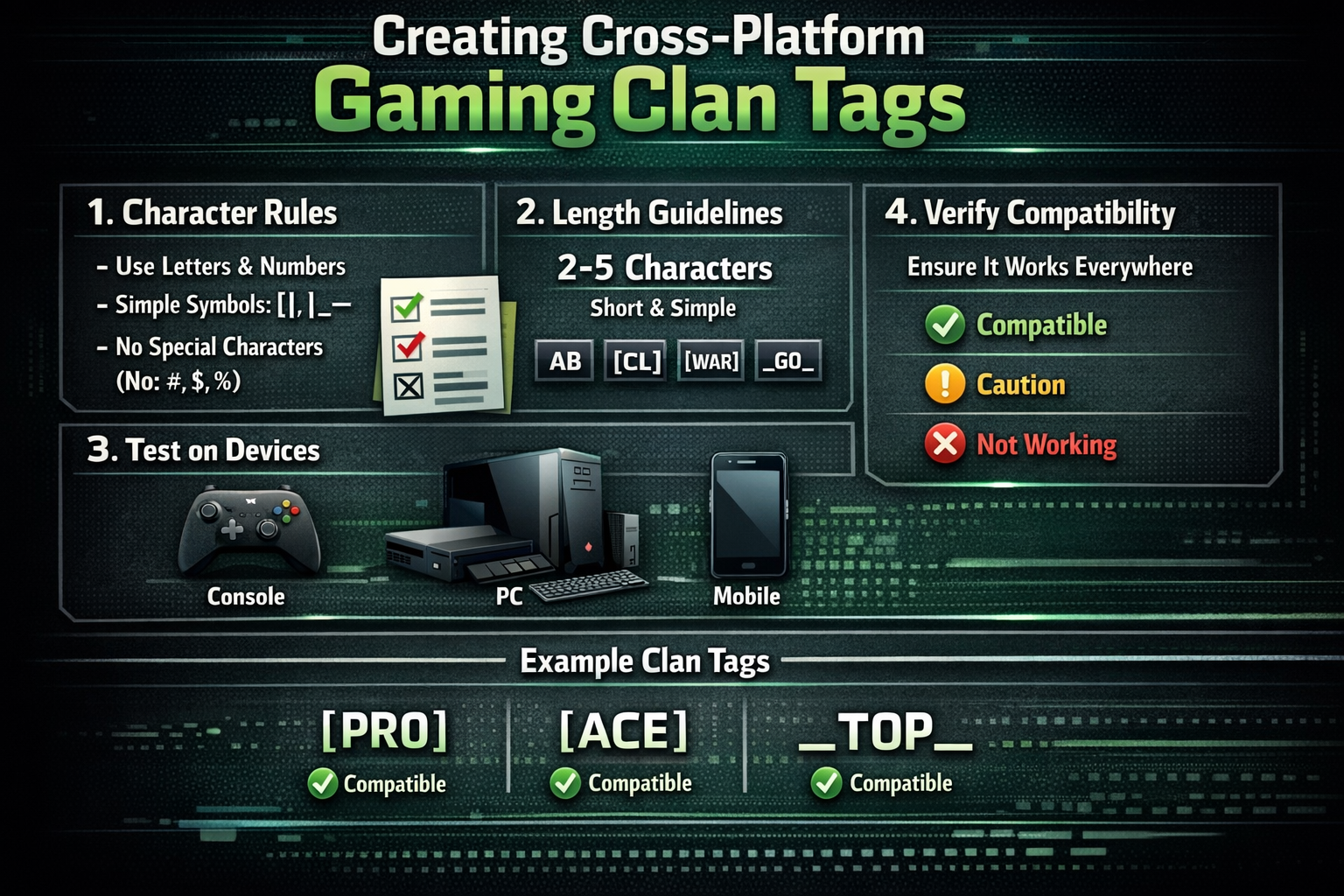
Here are proven clan tag examples organized by style and purpose, all tested for universal compatibility.
Pro-style tags convey serious competitive intent:
- [PRO] – Classic professional indicator
- |ACE| – Suggests top-tier skill
- TOP – Claims elite status
- -WIN- – Focuses on victory
- APEX – Single word impact
Competitive tags work well for tournament play:
- [ESL] – References esports leagues
- |GG| – Good game mentality
- MVP – Most valuable player
- -1ST- – Targeting first place
- RANK – Emphasizes competitive ranking
Casual/fun tags maintain friendly vibes:
- [FUN] – Emphasizes enjoyment
- |LOL| – Lighthearted approach
- GG – Good game attitude
- -YAY- – Celebratory feeling
- GAME – Simple and clear
Minimalist tags offer clean aesthetics:
- – Single letter impact
- |1| – Numerical simplicity
- A – Alphabetical start
- -Z- – Ending emphasis
- GO – Action-oriented
Each example uses only universal characters, stays within safe length limits, and maintains readability across all device types.
Common Clan Tag Mistakes to Avoid
Learning from others’ mistakes saves time and frustration. Here are the most frequent clan tag errors that break device compatibility.
Copy-paste fonts represent the biggest trap for new clan creators. Those cool-looking “fancy text” generators create Unicode characters that look like stylized letters but aren’t actually standard text. They’ll work on some devices while failing completely on others.
Emoji use seems fun but creates massive compatibility issues. While
😎COOL
😎 might look awesome on your phone, most gaming platforms either block emojis entirely or display them as empty squares. Save emojis for social media, not clan tags.
Too many symbols overwhelm both systems and readability. Tags like ★☆[PRO]☆★ might seem impressive, but they’re likely to break on multiple platforms. More importantly, they’re hard to read during fast-paced gaming action.
Trademarked names create legal and technical problems. Using tags like [NIKE] or |XBOX| might trigger automatic filtering systems, and could potentially cause trademark issues if your clan gains prominence.
Other critical mistakes include:
- Using spaces (many systems don’t handle them properly)
- Mixing different symbol types inconsistently
- Creating tags longer than 5 characters
- Ignoring case sensitivity in games that care about it
- Not testing tags before committing to them
How to Test Your Clan Tag on Any Device
Proper testing prevents embarrassing compatibility failures and ensures your tag works everywhere your team plays.
Cross-platform testing checklist should include:
✅ PC Testing: Try your tag on Windows and Mac if possible
✅ Mobile Verification: Test on both Android and iOS devices
✅ Console Checking: Verify appearance on PlayStation and Xbox
✅ Game-Specific Testing: Check in each game your team plays
✅ Network Testing: Ensure tags display correctly in online matches
Emulator testing provides a cost-effective way to check multiple platforms. Use Android emulators on PC to test mobile compatibility, or browser-based testing tools that simulate different device displays.
Friends/device testing method leverages your existing network. Ask teammates with different devices to screenshot how your tag appears on their systems. This real-world testing often reveals issues that emulators miss.
Testing documentation helps track results:
- Create a simple spreadsheet listing devices and test results
- Take screenshots of tag appearance on each platform
- Note any rendering differences or display issues
- Record which games work best with your chosen tag
Quick testing tips:
- Test during off-peak hours to avoid network issues affecting display
- Try tags in both lobby and in-game situations
- Check how tags appear in different game modes
- Verify readability at various screen sizes and resolutions
Tools to Generate Compatible Gaming Clan Tags
The right tools streamline the clan tag creation process while ensuring compatibility across all devices.
ASCII text generators provide safe character options without compatibility risks. These tools stick to basic character sets that work universally, helping you create stylized looks without breaking device support.
Username preview tools show how your tag will appear across different platforms and games. Many gaming websites offer preview functions that simulate tag display on various systems before you commit to a choice.
In-game testing tools vary by platform but often include:
- Character preview in profile settings
- Tag display in practice modes
- Preview functions in clan management systems
- Username change previews before confirmation
Recommended online resources:
- ASCII art generators for safe symbol combinations
- Gaming forum tag databases with tested examples
- Platform-specific character support documentation
- Community-maintained compatibility lists
Manual testing remains crucial even with automated tools. No generator can perfectly simulate every device and game combination, so always verify your tag works in real gaming environments.
Frequently Asked Questions
What characters work in gaming clan tags? Letters A-Z, numbers 0-9, and basic symbols like brackets [ ], vertical bars |, underscores _, and hyphens – work reliably across all gaming platforms and devices.
Why does my clan tag look different on mobile? Mobile devices use different fonts and text rendering systems than PCs. Special characters or Unicode symbols often display as squares or disappear entirely on mobile platforms.
Can I use symbols in a clan tag? Yes, but stick to basic ASCII symbols like [ ], |, _, and -. Avoid Unicode symbols, emojis, or special characters that may not display properly across all devices.
How long should a clan tag be? Keep clan tags between 2-5 characters for maximum compatibility. Longer tags may get truncated or cause display issues in some games and platforms.
Do clan tags work the same on all games? No, each game has different character restrictions and display methods. Always test your tag in each game your team plays to ensure proper compatibility.
Conclusion
Creating a clan tag that works flawlessly across all devices doesn’t require sacrificing style for compatibility. By following the universal character guidelines, keeping tags concise, and thoroughly testing across platforms, you’ll build a strong team identity that displays consistently everywhere your clan competes.
The key is understanding that Make a Gaming Clan Tag That Works on Any Device means prioritizing function alongside form. Simple, clean designs using basic ASCII characters provide the reliability your team needs while still allowing for creative expression and memorable branding.
Your next steps:
- Choose your core characters from the safe ASCII set (A-Z, 0-9, basic symbols)
- Design 3-5 tag options following the length and compatibility guidelines
- Test thoroughly across PC, mobile, and console platforms
- Verify in your main games to ensure proper display and functionality
- Document what works for future reference and team consistency
Remember, the best clan tag is one that your entire team can use confidently across every platform and game. Start with these proven principles, test extensively, and you’ll create a tag that truly works on any device.