How to Use Unicode for Gamer Tags Safely
You already know how much a distinctive gamer tag may help if you’ve ever tried to stand out in a busy lobby. With Unicode characters, you may easily add style clean symbols, crispier fonts, or subtle design elements that your game’s basic keyboard just cannot produce. The issue? Many players are unaware that using the incorrect Unicode character might cause compatibility issues, activate filters, or even result in an account being flagged. You can use Unicode safely, confidently, and without jeopardizing your profile by following this guide.
Why Unicode Matters for Gamer Tags
You may access thousands of letters beyond the standard alphabet thanks to Unicode. You can add stylish symbols, artistic variations, or simple ornaments to your name to make your personality stand out. When done correctly, it still functions across platforms and has a polished appearance. Selecting characters that remain readable and won’t cause problems in-game is crucial.
How to Use Unicode Safely
Before you paste anything into your gamer tag, run it through a Unicode Text Converter that shows both the preview and the underlying character type. Many risky symbols look normal but behave differently under the hood.
Here’s a simple approach that keeps your tag safe:
- Convert your text using a trusted Unicode tool so you can preview the output clearly.
- Check readability on both light and dark backgrounds. Some symbols look perfect until the UI changes.
- Test for compatibility by trying it inside your game’s name field before saving. If the platform rejects the character, avoid it.
- Avoid invisible or zero-width characters. They’re popular for cheating name systems and often get flagged.
- Keep special characters minimal. One or two stylish glyphs usually look cleaner—and work everywhere.
What Is Unicode in Gamer Tags?
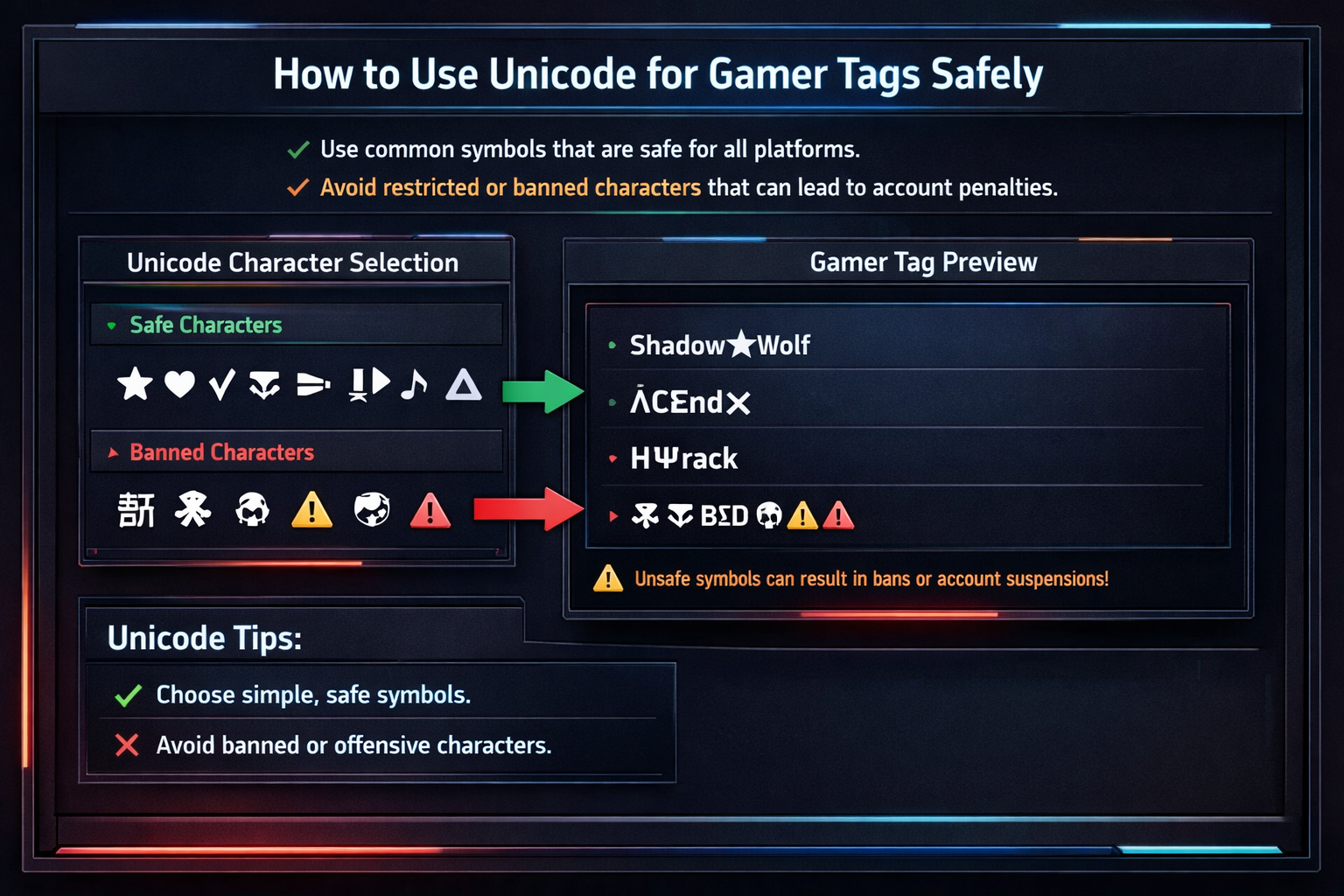
Unicode is a universal character encoding standard that goes far beyond the basic letters and numbers on your keyboard. While standard ASCII characters include A-Z, 0-9, and basic symbols, Unicode encompasses over 143,000 characters from virtually every writing system on Earth.
In gaming contexts, Unicode allows players to incorporate:
Standard Characters:
- Basic Latin letters (A-Z, a-z)
- Numbers (0-9)
- Common punctuation (., !, ?)
Unicode Symbols:
- Mathematical symbols (∑, ∞, ±)
- Geometric shapes (▲, ◆, ★)
- Currency symbols (€, ¥, ₿)
- Arrows and indicators (→, ↑, ⟩)
Special & Invisible Characters:
- Zero-width spaces
- Control characters
- Combining diacritical marks
Here’s the crucial difference: while “ProGamer123” uses only standard characters, “ProGαmer★123” incorporates Unicode (the Greek alpha and star symbol). The second version stands out visually but requires careful implementation to avoid platform violations.
Why Gamers Use Unicode Symbols in Gamer Tags
The competitive landscape of gaming usernames has pushed players toward creative solutions, and Unicode offers several compelling advantages:
**
�
� Stand Out Visually** In crowded lobbies and leaderboards, Unicode symbols create instant visual distinction. A name like “Shadow▲Elite” immediately catches the eye compared to “ShadowElite47.”
✅ Name Availability Popular gaming names are often taken, but Unicode variations frequently remain available. If “Phoenix” is unavailable, “Phøenix” or “Phoenix★” might be open.
🏆 Clan Branding Professional esports teams and gaming clans use Unicode for consistent branding across platforms. Symbols like ◆, ▲, or ★ become recognizable team identifiers.
🎨 Aesthetic Customization Unicode enables thematic consistency—fantasy players might use runes (ᚱᚢᚾᛖ), while sci-fi gamers prefer mathematical symbols (∑, ∞, ∆).
However, these benefits only matter if your Unicode gamer tag displays correctly and doesn’t violate platform policies. Let’s explore how to achieve this safely.
How to Use Unicode for Gamer Tags Safely ✅
Understanding how to use Unicode for gamer tags safely requires following a systematic approach that prioritizes compatibility and compliance across all your gaming platforms.
Follow Platform Name Policies
Each gaming platform maintains specific Unicode policies that change regularly. Here’s what you need to know:
Xbox Live:
- Supports basic Unicode symbols
- Prohibits invisible characters
- Automatically filters offensive Unicode combinations
- Name changes cost $9.99, so get it right the first time
PlayStation Network:
- More restrictive than Xbox
- Blocks many mathematical symbols
- Focuses on readability across all PlayStation devices
- Regional restrictions apply
Steam:
- Most permissive Unicode policy
- Allows frequent name changes
- Community-driven reporting system
- Some Unicode may not display in older games
Epic Games (Fortnite):
- Strict anti-impersonation policies
- Blocks Unicode that resembles official tags
- Regular policy updates due to competitive integrity
Riot Games (Valorant/League):
- Regional character set restrictions
- Competitive integrity focus
- Automatic Unicode validation during registration
Use Only Visible & Supported Characters
The golden rule of safe Unicode usage is visibility and readability. Your gamer tag should display identically across all devices and platforms where your friends might see it.
Safe Unicode Categories:
- Basic mathematical symbols: ±, ×, ÷, ∞
- Simple geometric shapes: ▲, ▼, ◆, ●
- Common currency symbols: €, £, ¥
- Directional arrows: →, ↑, ↓, ←
Avoid These Character Types:
- Zero-width joiners and spaces
- Combining diacritical marks
- Control characters (U+0000 to U+001F)
- Private use area characters
Test Your Gamer Tag Before Saving
Before committing to any Unicode gamer tag, test it thoroughly across multiple interfaces:
Essential Testing Checklist:
- Game Profile Display – Does it show correctly in your profile?
- Friends List – Can friends see and search for your name?
- In-Game Chat – Does it display properly in chat windows?
- Leaderboards – Is it readable in competitive rankings?
- Mobile App – Many platforms have mobile apps with different Unicode support
I recommend creating a test account first or using platform preview tools when available.
Avoid Impersonation-Style Characters
Gaming platforms aggressively protect against impersonation, and certain Unicode characters can trigger automatic violations:
High-Risk Unicode:
- Characters that mimic official badges or ranks
- Symbols resembling platform verification marks
- Unicode that creates fake spacing or formatting
- Characters that could impersonate admin/moderator tags
Remember, even unintentional impersonation can result in permanent bans.
Unicode Symbols That Can Get You Banned or Reset
Understanding which Unicode characters pose the highest risk is crucial for maintaining your gaming accounts. Platform moderation systems have become increasingly sophisticated at detecting problematic Unicode usage.
Invisible Unicode Characters
Zero-Width Space (U+200B): This invisible character has been exploited to create “duplicate” usernames or bypass name filters. Using it can result in immediate account restrictions.
Non-Breaking Space (U+00A0): While less problematic than zero-width characters, non-breaking spaces can cause display issues and trigger automated violations.
Other Invisible Characters to Avoid:
- Zero-Width Non-Joiner (U+200C)
- Zero-Width Joiner (U+200D)
- Word Joiner (U+2060)
- Invisible Separator (U+2063)
Exploit-Style or Glitched Symbols
Certain Unicode combinations can create visual exploits that platforms consider cheating:
Name Stretching: Using combining characters to make names appear longer than allowed character limits.
Overlapping Text: Unicode that causes your name to overlap with UI elements or other players’ names.
Font Confusion: Characters that appear as different symbols depending on the device or font, potentially creating offensive combinations.
Offensive or Restricted Unicode
Modern content filtering systems scan Unicode for potential violations:
- Symbol Combinations: Innocent Unicode symbols that combine to create inappropriate imagery
- Cultural Sensitivity: Religious or cultural symbols used inappropriately
- Political Symbols: Unicode characters associated with political movements or ideologies
Pro Tip: When in doubt, stick to widely-recognized symbols like basic shapes, arrows, and mathematical operators. These have the lowest risk of triggering automated moderation systems.
Platform-Specific Unicode Rules
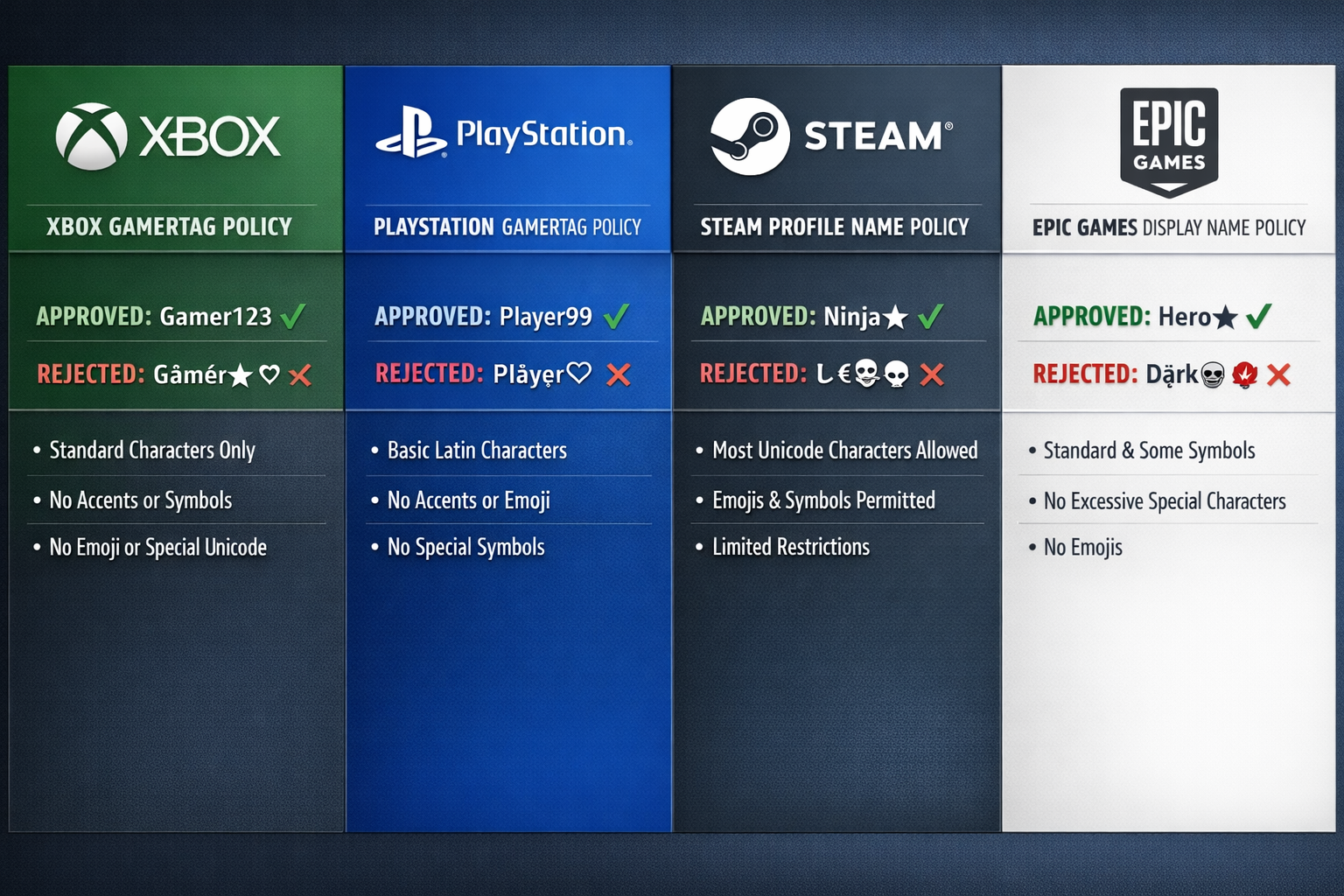
Each gaming platform has evolved unique approaches to Unicode support, reflecting their user bases, technical infrastructure, and content policies.
Xbox Gamer Tag Unicode Support
Xbox Live has implemented a graduated Unicode policy that balances creativity with safety:
Allowed Unicode:
- Basic Latin supplements (À, Ñ, Ü)
- Common mathematical operators (±, ×, ÷)
- Simple geometric shapes (●, ▲, ★)
- Currency symbols (€, £, ¥)
Restricted Unicode:
- Any invisible or zero-width characters
- Complex combining characters
- Private use area symbols
- Characters that don’t render on Xbox consoles
Xbox-Specific Considerations:
- Names must be readable on both Xbox consoles and Windows PC
- Mobile Xbox app compatibility is required
- Backward compatibility with Xbox 360 friend lists
PlayStation Network Unicode Limits
Sony maintains stricter Unicode policies than most competitors, prioritizing consistency across their ecosystem:
PSN Unicode Guidelines:
- Limited to basic symbol sets
- Regional restrictions based on account location
- Automatic filtering of gaming-specific exploits
- Cross-platform game compatibility requirements
PlayStation-Specific Restrictions:
- Many mathematical symbols are blocked
- Emphasis on readability across PS4, PS5, and mobile
- Integration with PlayStation Now streaming requirements
Steam Unicode Name Rules
Valve’s approach to Unicode reflects Steam’s open platform philosophy:
Steam Unicode Benefits:
- Most permissive major platform
- Frequent name changes allowed (with some restrictions)
- Community-driven reporting system
- Extensive Unicode support in Steam client
Steam Considerations:
- Individual games may have different Unicode support
- Community features (forums, reviews) may not display all Unicode
- Some older games don’t render Unicode properly
Mobile Games vs PC Games Differences
The mobile gaming revolution has created significant Unicode compatibility challenges:
Mobile-Specific Issues:
- Limited font support on mobile devices
- Touch keyboard Unicode input difficulties
- Cross-platform play compatibility requirements
- Regional app store restrictions
PC Gaming Advantages:
- Full Unicode input capability
- Better font rendering support
- Easier Unicode testing and preview
- More flexible platform policies
Best Tools to Test Unicode Gamer Tags Safely
Before implementing any Unicode gamer tag, use these essential tools to verify compatibility and safety across platforms.
Unicode Text Testers
Unicode Character Inspector:
- Identifies specific Unicode code points
- Reveals invisible characters
- Shows character categories and properties
- Essential for detecting problematic symbols
Cross-Platform Unicode Viewers:
- Test how your name appears on different operating systems
- Preview mobile vs desktop rendering
- Identify font-dependent display issues
Gamer Tag Preview Tools
Platform-Specific Simulators: Many gaming platforms offer official tools to preview usernames:
- Xbox Gamertag Checker: Official Microsoft tool for testing name availability and compliance
- PlayStation Name Validator: Sony’s internal checking system (accessed through account settings)
- Steam Profile Preview: Built into Steam’s name change interface
Platform Name Availability Checkers
Multi-Platform Checkers:
- Verify name availability across multiple gaming services simultaneously
- Identify Unicode variations that might be available
- Save time by checking all platforms at once
Individual Platform Tools:
- More accurate for specific platform requirements
- Often include real-time policy compliance checking
- Provide alternative suggestions for taken names
Font vs Unicode Converters (Difference Explained)
Critical Distinction: Many online “Unicode generators” actually create font variations, not true Unicode. Here’s the difference:
True Unicode:
- Uses actual Unicode character codes
- Displays consistently across platforms
- Generally safer for gaming platforms
- Example: Using actual Greek letters (α, β, γ)
Font Generators:
- Create styled text using Unicode mathematical symbols
- Often breaks on gaming platforms
- Can trigger moderation systems
- Example: Converting “text” to “𝓽𝓮𝔁𝓽” using mathematical script symbols
Warning: Avoid font generator websites that promise “fancy text” or “cool fonts.” These often create Unicode combinations that violate gaming platform policies.
Common Unicode Gamer Tag Mistakes (And How to Avoid Them)
Learning from others’ mistakes can save your gaming accounts from unnecessary restrictions or bans. Here are the most frequent Unicode errors I’ve observed:
Copy-Pasting from Unsafe Generators
The Mistake: Using online “fancy text” generators without understanding what Unicode they actually create.
The Risk: These tools often generate mathematical script Unicode (intended for equations) or combine multiple Unicode characters in ways that gaming platforms flag as exploitative.
The Solution: Always verify any generated text using Unicode inspection tools before applying it to your gaming accounts.
Using Too Many Symbols
The Mistake: Creating gamer tags like “★▲●ProGamer●▲★” with excessive Unicode decoration.
The Risk: Overwhelming Unicode usage triggers automated moderation systems and makes your name difficult to read or remember.
The Solution: Follow the “less is more” principle—one or two well-placed Unicode symbols are more effective than many.
Not Testing on Mobile
The Mistake: Only testing Unicode gamer tags on PC without checking mobile compatibility.
The Risk: Many gaming platforms now prioritize mobile experiences, and Unicode that doesn’t display properly on mobile devices may be restricted.
The Solution: Always test your proposed gamer tag on both desktop and mobile versions of your gaming platforms.
Ignoring Future Name Policy Updates
The Mistake: Assuming current Unicode policies will remain unchanged.
The Risk: Gaming platforms regularly update their naming policies, and previously acceptable Unicode may become restricted.
The Solution: Stay informed about platform policy updates and be prepared to modify your gamer tag if necessary.
FAQs
Can Unicode gamer tags get you banned?
Yes, inappropriate Unicode usage can result in account restrictions, forced name changes, or permanent bans. The key risks include:
- Using invisible characters to exploit naming systems
- Creating Unicode combinations that appear offensive
- Attempting to impersonate official accounts or staff
- Using Unicode that breaks game interfaces or displays
However, proper Unicode usage following platform guidelines is generally safe and widely accepted across gaming platforms.
Are Unicode symbols allowed in all games?
No, Unicode support varies significantly between games and platforms. Here’s what affects compatibility:
- Game Engine: Older engines may not support Unicode rendering
- Platform Policies: Each gaming service has different Unicode restrictions
- Regional Restrictions: Some Unicode characters are blocked in specific countries
- Cross-Platform Play: Games supporting multiple platforms often use the most restrictive Unicode policies
Always check specific game and platform policies before committing to a Unicode gamer tag.
Why does my Unicode name show as boxes?
Unicode characters appearing as empty boxes (□) indicates a font or rendering issue:
Common Causes:
- The device doesn’t have fonts containing your Unicode characters
- The game or platform doesn’t support specific Unicode ranges
- Regional font restrictions on mobile devices
- Outdated software or game clients
Solutions:
- Choose more widely-supported Unicode symbols
- Test on multiple devices before finalizing your name
- Stick to basic Unicode categories (mathematical symbols, simple shapes)
What is the safest Unicode symbol to use?
The safest Unicode symbols for gaming are basic mathematical and geometric characters:
Lowest Risk Options:
- Basic shapes: ●, ▲, ▼, ◆
- Simple math: ±, ×, ÷, ∞
- Common currency: €, £, ¥
- Basic arrows: →, ↑, ↓, ←
These symbols have broad platform support, clear visual appearance, and minimal risk of policy violations.
Final Checklist – Safe Unicode Gamer Tag Setup
Before implementing your Unicode gamer tag, verify each of these essential safety criteria:
✔ Platform-Approved Characters
- Checked against current platform naming policies
- Verified compatibility with all your gaming services
- Confirmed no recent policy changes affect your chosen Unicode
✔ Fully Visible on All Devices
- Tested on desktop gaming platforms
- Verified mobile app compatibility
- Checked cross-platform game display
- Confirmed readability in chat systems
✔ No Invisible or Exploit Symbols
- Scanned for zero-width characters
- Verified no combining character exploits
- Confirmed no invisible Unicode elements
- Checked against known exploit patterns
✔ Easy to Read and Searchable
- Friends can easily find your profile
- Name displays clearly in leaderboards
- Readable in various game interfaces
- Maintains clarity at different font sizes
✔ Tested Before Confirming
- Used official platform preview tools
- Tested with multiple devices and browsers
- Verified with friends across different platforms
- Confirmed backup name options if issues arise
Understanding how to use Unicode for gamer tags safely in 2026 requires balancing creativity with platform compliance. By following these guidelines, testing thoroughly, and staying informed about policy changes, you can create distinctive gaming identities that enhance rather than compromise your gaming experience.
Remember, the best Unicode gamer tag is one that looks great, displays consistently, and never puts your gaming accounts at risk. When in doubt, err on the side of caution your gaming reputation and account security are worth more than any stylistic flourish.